The System tab contains a list of server settings for configuring and customizing your poker server. It also contains a toolbar for starting and stopping the game server as described below.
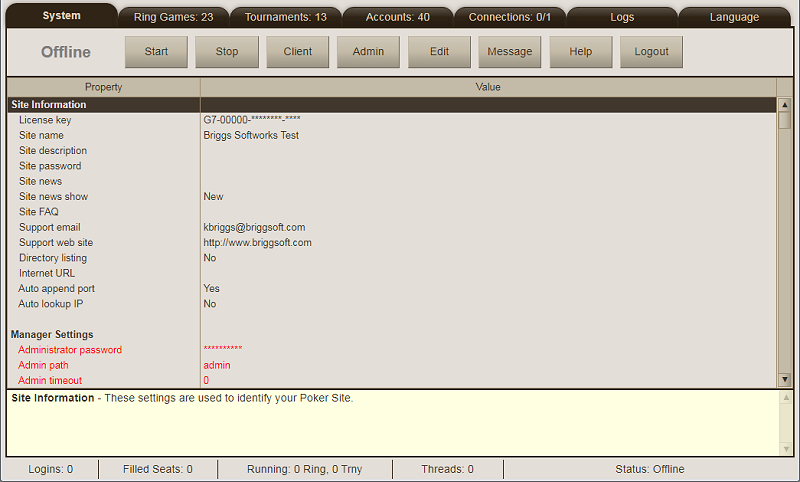
Start - Click this button to put your game server online. This allows players to connect and log into your poker site. Ring games and tournaments that are set for "Auto Online" will be activated immediately.
Stop - Click this button to take your game server offline. No one can connect to your server when it is in the offline state.
Client - Click this button to load the player client into a new browser tab.
Admin - (Gold feature) Click this button to display the admin rights editor.
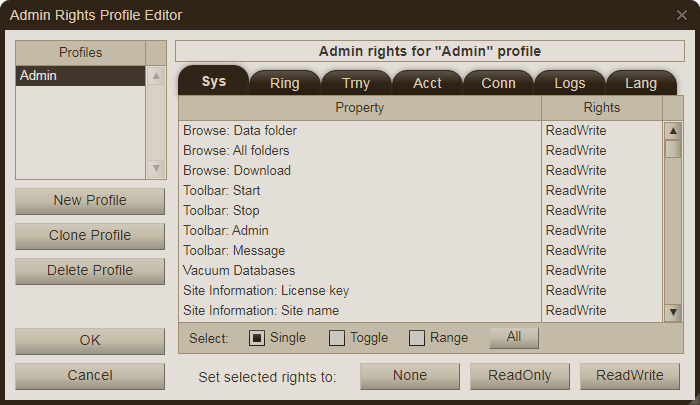
In the non-Gold editions, only the "Administrator" can log into the Admin Console. In the Gold edition, you can allow any number of player accounts to login into the Admin Console by creating at least one admin profile and then entering that profile name into their "Admin Profile" setting. Those players can then login using their normal player name and password. Multiple accounts can share the same profile. The data they can see and functions they can perform depend on the rights specified in the profile. To give full access rights (i.e., same as the Administrator), create a profile (names can be up to 15 alphanumeric characters) and assign ReadWrite to every item. Warning: be careful with the "Browse" rights on the Sys tab as that can give access to all files on your server. Click the OK button to save all changes made.
Edit - Click this button to edit the selected property value in the list below the toolbar. You can also double-click a property value directly to invoke the value editor.
Message - Click this button to post a message from the Administrator into the lobby chat box in the client interface.
Help - Click this button to display the help menu.
Load Help File - Opens a new browser tab and displays the help file page from www.briggsoft.com.
Check For Newer Version - Performs a check to see if you have the latest version of Poker Mavens.
Display Data Folder - Opens a folder browsing dialog, displaying files on your server. Includes a function for downloading files from your server to your local PC.
Show Debugger - Displays the debug dialog, which catches internal coding errors.
Show Threads - Displays the list of active threads running on the poker server.
Vacuum Databases - Allows you to remove deleted records from selected database files. Typically only used after deleting a large number of records.
About Poker Mavens - Displays a dialog box with version and copyright information.
Logout - Click this button to log out of the Admin Console. The poker server will continue to run and accept player connections if you clicked the Start button.
The property editor contains a list of configuration settings, grouped into several sections as described below. To edit a property value, either double-click it or select it and then click the Edit button on the toolbar. When a property is selected in the list, a brief description of it is displayed in the yellow box just below the list. Note: Some properties (displayed in red color) cannot be changed while the game server is online.
Site Information - this section contains properties for identifying and publishing your poker site.
License key - Enter your custom license key that was provided by Briggs Softworks. This key is required to operate your site. It is not used in the trial version, however.
Site name - Enter a unique name for your poker site, up to 50 characters. This name will appear in the player client and in the server directory at PokerMavens.net (if the Directory Listing property is set to Yes).
Site description - This is an optional site description, up to 500 characters. This text is displayed when your site is selected in the server directory at PokerMavens.net (if the Directory Listing property is set to Yes).
Site password - Optional site password. Leave blank if your site will be open to the public.
Site password POST - When using a Site Password, set to Yes to submit the form data with the "POST" method, which hides the site password in the headers. Set to No to use the "GET" method, which embeds the site password in the visible URL.
Site news - Optional site news. This text (including HTML markup) will be displayed to each player when they login, depending on the value of the "Site news show" setting. Players can also view it any time by selecting the news option from the client help menu. If you include a link with an anchor tag, be sure to use a target="_blank" attribute so that a new window will be opened when clicked. Otherwise the contents of the game site will be replaced and the player will disconnect.
Site news show - Set to "New", "Yes", or "No" to indicate if the Site News should be displayed to each player immediately after they log in. Use "New" (the default) to only show the text if it has been edited since the player's previous login.
Site FAQ - Optional site FAQ. This frequently-asked-questions text (including HTML markup) can be displayed by the players from their client lobby help menu. If you include a link with an anchor tag, be sure to use a target="_blank" attribute so that a new window will be opened when clicked. Otherwise the contents of the game site will be replaced and the player will disconnect.
Support email - This is an optional email address where players can contact you via the Help menu in the player client. Leave blank for none.
Support web site - This is an optional web site address (include the http:// prefix) where players can get more information about your site. A link to this site will appear in the Help menu in the player client. Leave blank for none.
Directory listing - Select Yes to list your site at PokerMavens.net, subject to the terms in the License Agreement. If you select a site password then your site will be listed in the private section. Trial versions are listed at PokerMavens.net/trial instead.
Internet URL - This is your Internet IP address or domain name that your players will connect to. Note that 128-bit IPv6 addresses must be surrounded by square brackets (e.g., [1234:1234:1234:1234:1234:1234:1234:1234]) whereas 32-bit IPv4 addresses remain as-is (e.g., 123.123.123.123). Click the Lookup button to get this value automatically. If your site has its own domain name, you can enter it instead. Set "Auto append port" to No if this address points to a custom login page instead of a direct client connection.
Auto append port - Select Yes (the default) to append the file port number to the Internet IP address sent to the directory listing at pokermavens.net. This is needed to load the client directly. When using a custom login page, select No to direct players to the Internet URL (or domain) address as listed.
Auto lookup IP - If this property is set to Yes, the software will perform the Internet IP lookup function automatically for you each time you put the server online. Set this to No if you were provided a static Internet IP address from your Internet service provider or if you have your own domain name.
Manager Settings - this section contains connection settings that can only be changed from the Service Manager program.
Administration password - Password for the Administrator login into the Admin Console. The password is hashed before being saved so it cannot be viewed again. Note that in the Gold version, you can give players admin rights and they can login to the Admin Console using their own account name and password.
Administration path - The relative path to use to access the Admin Console. The default path is "admin" and is not case-sensitive. For example, using the default value you would access the Admin Console on the localhost at http://127.0.0.1/admin (assuming default HTTP port of 80).
Administration timeout - Specify the number of minutes of inactivity allowed before a Admin Console session times out. Use 0 to disable this feature.
Administration whitelist - Specify a list of IP addresses and domains (one per line) that can access the Admin Console. This is a security feature that can prevent unauthorized access to your game server even if the Administration password becomes compromised. Localhost 127.0.0.1 is automatically whitelisted. Leave this setting blank to allow access from any IP address. You may include asterisks as octet/hextet wildcards in IPv4/IPv6 addresses (examples: 192.168.1.*, 1234:1234:1234:1234:1234:1234:1234:*).
HTTP port - This is the HTTP port number that will serve files to the player and admin web browsers (non-encrypted connections). The default value is 80.
WS port - This is the WebSocket port number that will be used to transfer game packets to and from the player and admin clients (non-encrypted connections). The default value is 8080.
SSL encryption - Select Yes to allow an encrypted connection between your server and all clients (connection begins with https instead of http). You must obtain an SSL certificate for your domain to enable this feature and have the OpenSSL files ssleay32.dll and libeay32.dll installed in your program folder. Check the Poker Mavens FAQ File for download and installation instructions.
SSL key file - Specify the location of your private key file if SSL encryption is enabled. An "SSL" folder has been created in your data folder for storing your key and cert files.
SSL password - Specify the password used to encrypt your SSL private key. Leave blank if the private key is not encrypted.
SSL certificate file - This is your certificate file that was provided by your certificate authority.
SSL root certificate file - This is your root certificate file that was provided by your certificate authority. This file may have a .ca-bundle extension if provided by Comodo.
SSL redirect - Select Yes to automatically redirect connections on the non-encrypted HTTP port to the SSL-encrypted HTTPS port. The SSL encryption setting must also be enabled.
HTTPS port - This is the HTTPS port number that will serve files to the player and admin web browsers (SSL-encrypted connections). The default value is 443.
WSS port - This is the WebSocket port number that will be used to transfer packets to and from the player and admin clients (SSL-encrypted connections). The default value is 8443.
Local IP address - This is one or more local IPs to bind to your server. Check the box next to an IP to include it. Check the "All" box (default setting) to bind to all available addresses.
Server Settings - this section contains technical settings related to the game server.
Max sessions - This is the maximum number of sessions allowed (default is 500). A session is a connection that has been assigned a Session ID and has established a websocket exchange between the client and server prior to login. A value of 0 will prevent any new sessions. Generally this value should be less than the "Max PP connections" setting (if it is nonzero) so that it can return a "too many connections" message to the player. Otherwise the connection will be blocked before a session can be requested.
Max idle minutes - This is the maximum number of minutes that a player's connection can be idle before it is automatically terminated. Set to 0 to disable. Idle time is determined by the last packet received from a player as recorded in the Last Action column on the Connections tab.
Max disconnect minutes - This is the number of minutes (1 to 60) that the server will wait before automatically logging out a disconnected player. The default value is 2 minutes.
Allow duplicate IPs - Select No to prevent multiple logins from the same IP address, unless they appear in the Duplicate IP whitelist.
Duplicate IP whitelist - Specify a list of player IP addresses and domains (one per line) that are exempt when "Allow duplicate IPs" is set to "No". The default setting contains 127.0.0.1 and 0:0:0:0:0:0:0:1 (localhost IPs).
Allow duplicate PCs - Select No to prevent multiple logins from the same computer. Note: Client computers are assigned a random 32-bit identification number (PC ID) that is saved locally on the first login attempt. It is possible (but not likely) for more than one computer to have the same PC ID.
Autostart server at bootup - Select Yes and the poker server be put online when the installed service loads during bootup.
KeepAlive connections - Set to Yes to return the KeepAlive HTTP header for all media requests on the HTTP port. Setting to No will cause the client to create a separate connection for each file request.
Connection sweep minutes - This is the number of minutes (2 to 120) that an inactive/rogue connection can attach to the HTTP or WS port before it is terminated by the server. Set to 0 to disable this feature. HTTP port sweeps and WS port sweeps are reported in the Event Log at 1-minute intervals.
Max HTTP connections - This is the maximum number of raw connections allowed on the HTTP Port at any given time. A value of 0 represents no fixed limit. This setting is meant to be used as a defense against a primitive denial-of-service attack that simply tries to overwhelm your site with too many connections. Each connection creates a new thread that requires system memory, so too many connections could bring an out-of-memory condition that prevents the poker server from functioning properly. This limit is handled silently by the socket component, so rejected connections are not reported in the Event Log.
Max HTTP connections per IP - This is the maximum number of raw connections per IP address allowed on the HTTP Port at any given time. A value of 0 represents no fixed limit. This setting is similar to the "Max HTTP connections" setting above, except it applies to individual IPs connecting to your site instead of a total limit. When setting a nonzero value, keep in mind that most browsers will initially make 6 connections to your http port to retrieve the client HTML and assorted media elements. So a value of 1 to 5 is not recommended. Connections rejected by this setting are reported in the Event Log at 1-minute intervals.
Max WS connections - This is the maximum number of raw connections allowed on the WebSocket Port at any given time. A value of 0 represents no fixed limit. This setting is similar to the "Max HTTP connections" setting, except it applies to the websocket port, where the websocket connection is established between the client and server. Unlike the http port, the browser will only make 1 connection to the websocket port. This value also differs from the "Max sessions" setting as it will completely block any connection attempts over the limit without any return message to the user. This limit is handled silently by the socket component so rejected connections are not reported in the Event Log.
Max WS connections per IP - This is the maximum number of raw connections per IP address allowed on the WebSocket Port at any given time. A value of 0 represents no fixed limit. This setting is similar to the "Max WS connections" setting above, except it applies to individual IPs connecting to your site instead of a total limit. Connections rejected by this setting are reported in the Event Log at 1-minute intervals.
Max connection whitelist - Specify a list of IP addresses and domains (one per line) that are exempt from any of the Max HTTP/WS connection limits. Typically used to ensure API calls and Admin Console access are still available when site is at maximum capacity. You may include asterisks as octet/hextet wildcards in IPv4/IPv6 addresses (examples: 192.168.1.*, 1234:1234:1234:1234:1234:1234:1234:*).
Bad password max - This is the maximum number of invalid login attempts allowed per IP address in a 5-minute period. This setting applies to player logins, admin logins, and API access. Use a value of 0 to disable this feature.
Proxy IP header - If the poker server is placed behind a proxy server (typically called a reverse proxy), you can retrieve the player's real IP address from a header that gets added to the HTTP call by the proxy server. Otherwise, all connections will appear to be coming from the same IP address (or small group of addresses). Most will use "X-Forwarded-For" as that header name, although CloudFlare (a popular proxy service) has their own custom header called "CF-Connecting-IP". Leave this value blank if you are not using a proxy service.
Proxy WSS - Select Yes to force the client to make a secure websocket connection. This is to be used when the poker server is behind a proxy server such that the client-to-proxy connection is encrypted but the proxy-to-poker server connection is not. Select No for normal operation. This setting is ignored when connecting to localhost, 127.0.0.1, or [::1].
Same-origin policy - Select Yes (the default setting) to ensure the Host and Origin headers in the WebSocket connections have a common host name. This is used to prevent cross-site websocket attacks against your site.
API Settings - this section contains settings for the Application Programming Interface (API)
Enable API - Select Yes to enable the Application Programming Interface, which allows you to control the server via an external program. You must specify an API Password to enable this feature.
API password - You must enter a password here to use the API feature. The password is hashed before being saved so it cannot be viewed again.
API whitelist - Specify a list of IP addresses and domains (one per line) that can access the API commands. This is a security feature that can prevent unauthorized access to your game server even if the API password becomes compromised. Leave this setting blank to allow access from any IP address. You may include asterisks as octet/hextet wildcards in IPv4/IPv6 addresses (examples: 192.168.1.*, 1234:1234:1234:1234:1234:1234:1234:*).
API path - Specify the relative path to use to access the application programming interface. Do not include the leading / character. The default path is "api" and is not case-sensitive. For example, using the default value you would access the API on the localhost at http://127.0.0.1/api (assuming default http port of 80).
Chip Settings - this section contains chip, balance, and currency settings.
Primary currency format - This is a formatting mask to determine how primary chip and balance values are displayed in the client with an optional currency symbol, with %1% acting as a placeholder for the numerical value. For example, $%1% would display chip values with a dollar sign prefix ($1.23). The default %1% value (with no prefix or suffix) will display the currency as "chips" in the client.
Starting primary balance - This is the amount of primary currency given to new players. Buy-ins are debited from this balance when a player joins a ring game or a tournament that uses the primary currency. Any amount they still have when leaving a ring game (or winnings from a tournament) are credited back to their balance. The default value is 0.
Allow negative primary balance - Set to Yes to allow player primary balances to go below zero, thus giving them unlimited buy-ins for ring games and tournaments that use the primary currency. Otherwise, players will not be able to play if they run out of chips until the administrator manually resets their account balance.
Allow primary balance resets - Select Yes to allow players to request more chips when their primary balance drops below the starting primary balance value. "Starting primary balance" value must be greater than 0 and "Allow negative primary balance" must be disabled to use this feature.
Primary balance reset minutes - This is the minimum time (in minutes) that players must wait before requesting more chips when "Allow primary balance resets" is enabled.
Allow primary chip transfers - Select Yes to allow players to transfer primary currency to each other via the client lobby menu. "Allow negative primary balance" must be disabled to offer this option. Also, each account has individual settings to transfer and accept chips that must be enabled.
Enable secondary currency - (Gold feature) Set to Yes to enable a secondary currency on your site. Tables that use the secondary currency will be funded from the player's "Balance2" setting.
Secondary currency format - (Gold feature) This is a formatting mask to determine how secondary chip and balance values are displayed in the client with an optional currency symbol, with %1% acting as a placeholder for the numerical value. For example, $%1% would display chip values with a dollar sign prefix ($1.23). The default %1% value (with no prefix or suffix) will display the currency as "chips" in the client.
Starting secondary balance - (Gold feature) This is the amount of secondary currency given to new players. Buy-ins are debited from this balance when a player joins a ring game or a tournament that uses the secondary currency. Any amount they still have when leaving a ring game (or winnings from a tournament) are credited back to their balance. The default value is 0.
Allow negative secondary balance - (Gold feature) Set to Yes to allow player secondary balances to go below zero, thus giving them unlimited buy-ins for ring games and tournaments that use the secondary currency. Otherwise, players will not be able to play if they run out of chips until the administrator manually resets their account balance.
Allow secondary balance resets - (Gold feature) Select Yes to allow players to request more chips when their secondary balance drops below the starting secondary balance value. "Starting secondary balance" value must be greater than 0 and "Allow negative secondary balance" must be disabled to use this feature.
Secondary balance reset minutes - (Gold feature) This is the minimum time (in minutes) that players must wait before requesting more chips when "Allow secondary balance resets" is enabled.
Allow secondary chip transfers - (Gold feature) Select Yes to allow players to transfer secondary currency to each other via the client lobby menu. "Allow negative secondary balance" must be disabled to offer this option. Also, each account has individual settings to transfer and accept chips that must be enabled.
Account Settings - this section contains settings related to the player accounts.
Require session keys - Select Yes to only allow automated player logins via the SessionKey parameter generated through the API. Select No to allow players to login manually with their regular account password in addition to the automated methods. See the Technical Information/Misc topic for more information.
Minimum name length - This is the minimum player name length allowed, from 1 to 10 characters. The default value is 3. Note that the maximum length is fixed at 12 characters. Changing this setting does not affect existing accounts.
Allow Unicode names - Select Yes (the default) to allow player names to contain letters from non-English alphabets. Select No to restrict names to A to Z (in addition to digits, dashes and underscores).
Allow new accounts - Select Yes to allow new players to create an account at your site. Otherwise, new accounts can only be created by the administrator from the Accounts tab or via the API.
Allow account changes - Select Yes to allow players to change settings in their account (avatar, real name, gender, location, password, and email). Otherwise, accounts can only be edited by the administrator from the Accounts tab or via the API.
Allow password recovery - Select Yes to display an "Email My Password" button in the client login dialog. You must fill in the SMTP settings to use this feature.
Validate email addresses - Select Yes to force email address validation. Players will be required to enter a code (sent to their email account) before they can login for the first time or after they change their email address. You must fill in the SMTP settings to use this feature.
Allow duplicate email addresses - Select No (the default value) to prevent a player from creating an account that uses the same email address as an existing account.
Crash recovery - Select Yes to automatically refund player accounts after a server crash or power outage. A system of data files is created in the CrashProtect subfolder of the data folder while tables are active. They are normally deleted automatically when the tables are emptied. If any of these files still exist when the program restarts, that indicates an improper shutdown from the previous session and player accounts were not credited.
A file of chip counts is maintained for each ring game and is updated at the end of each hand and also when players join or leave the table, or add more chips. Two files are maintained for tournments, one for registration lists and another for running tournaments. For registrations, the buy-in amounts are recorded each time a player registers or unregisters from the tournament. For running tournaments, an equal share of the remaining prize pool is recorded for the remaining entrants and is updated each time a player gets knocked out of the tournament.
Enable Real Name field - Select Yes to prompt players for their real name when creating a new account.
Enable Location field - Select Yes to prompt players for their location with creating a new account.
Enable Gender field - Select Yes to prompt players for their gender when creating a new account.
Custom field #1 - Enter a name and description (separated by a colon) for Custom Field #1, displayed in the client interface when a player creates their account or changes their account settings. Leave blank to disable this field. Example: Referral:Where did you hear about us?
Custom field #2 - Enter a name and description (separated by a colon) for Custom Field #2, displayed in the client interface when a player creates their account or changes their account settings. Leave blank to disable this field. Example: Referral:Where did you hear about us?
Custom field #3 - Enter a name and description (separated by a colon) for Custom Field #3, displayed in the client interface when a player creates their account or changes their account settings. Leave blank to disable this field. Example: Referral:Where did you hear about us?
Custom field #4 - Enter a name and description (separated by a colon) for Custom Field #4, displayed in the client interface when a player creates their account or changes their account settings. Leave blank to disable this field. Example: Referral:Where did you hear about us?
Custom field #5 - Enter a name and description (separated by a colon) for Custom Field #5, displayed in the client interface when a player creates their account or changes their account settings. Leave blank to disable this field. Example: Referral:Where did you hear about us?
Allow duplicate tickets - Select Yes to allow players to hold multiple copies of any particular tournament ticket token. The default setting is "No". Note that changing this setting from Yes to No will not automatically remove existing duplicates until the software is restarted or individual accounts are edited.
Allow self-suspension - Select Yes to display a "Suspend" option in the client module Account menu, which allows a player to suspend their own account for a specified number of minutes, hours, and days.
Client Settings - this section contains settings related to the player client interface.
Enable custom language 1 - Select Yes to replace the default captions and messages in the player client with the ones specified on the Language tab. When multiple languages are enabled, the lowest-numbered language becomes the default and the player can choose between them inside the client. The language can also be specified with a startup URL parameter.
Enable custom language 2 - Select Yes to replace the default captions and messages in the player client with the ones specified on the Language tab. When multiple languages are enabled, the lowest-numbered language becomes the default and the player can choose between them inside the client. The language can also be specified with a startup URL parameter.
Enable custom language 3 - Select Yes to replace the default captions and messages in the player client with the ones specified on the Language tab. When multiple languages are enabled, the lowest-numbered language becomes the default and the player can choose between them inside the client. The language can also be specified with a startup URL parameter.
Enable custom language 4 - Select Yes to replace the default captions and messages in the player client with the ones specified on the Language tab. When multiple languages are enabled, the lowest-numbered language becomes the default and the player can choose between them inside the client. The language can also be specified with a startup URL parameter.
Enable custom language 5 - Select Yes to replace the default captions and messages in the player client with the ones specified on the Language tab. When multiple languages are enabled, the lowest-numbered language becomes the default and the player can choose between them inside the client. The language can also be specified with a startup URL parameter.
Remove About dialog - (Gold feature) Select Yes to remove the "About" dialog that displays the Briggs Softworks copyright notice in the player client.
Sit and Go tab - Select Yes to separate all of the "Start when full" and "Start on demand" tournaments and display them in their own "Sit & Go" tab in the client lobby.
Logout link - (Gold feature) Specify an optional landing page URL (including the http prefix) to forward the players to after they log out of the client.
Show player title in chat - Select Yes to display the player's title setting in the chat boxes. The title (if not blank) will appear between square brackets in front of their name.
Table chat - Set to Yes to allow players to use the table chat feature. This setting does not affect the chat in the lobby window, and setting it to No does not remove the chat boxes since they will still be used to display Dealer, System, and Administrator messages.
Lobby chat - Set to Yes to display a chat box in the client lobby window. This setting does not affect the chat in the table windows.
Lobby chat permission - Set a permission token (15 alphanumeric characters max, case-sensitive) to restrict use of the lobby chat feature to players that have a matching token in their account settings. Prefix with a hyphen (-) to only exclude players who have the token. Leave blank to allow all players to enter text in the lobby chat. For example, if you set this value to TEST then only players who have a TEST token in their permissions field will be able to enter messages into the lobby chat. Or if you set this value to -TEST then everyone can use the chat except for the players who have a TEST token in their permissions field.
Profanity filter - Create a list of terms that will be filtered out (replaced with asterisks) in the player chat window. Also, players will not be able to create new accounts that contain these terms in the player name or location text.
Emoticon filter - Create a list (one per line) of emoji=emoticon filters for the chat system, so that players can type in certain keystroke combinations (the emoticon) and have it display as the equivalent unicode emoji character. For example, the common "smiley face" would have the entry 1F60A=:) where 1F60A represents the 32-bit unicode character number, followed by an equals sign, followed by the :) emoticon characters. Note that these are not detailed color graphics like you may see on a phone or message forum. They are just simple unicode characters that are part of the font itself. The default list is below but can be deleted, modified, or expanded as you wish. Note that the player must separate the emoticon characters from other text with at least one space character to reduce the chance of creating emojis unintentionally.
2639=:(
1F604=:D
1F609=;)
1F60A=:)
1F60E=8)
1F610=:|
1F616=:?
1F61D=:P
1F620=:x
1F632=:o
Chat flood max - This is the maximum number of chat messages that a player can enter during the specified chat flood period. Set to 0 to disable this feature.
Chat flood period - This is the chat flood period, expressed in seconds. The chat flood penalty is invoked when the player exceeds the chat flood max count during this period of time. Set to 0 to disable this feature.
Chat flood penalty - This is the number of minutes to suspend a player's chat when they exceed the specified chat flood limit. Set to 0 to disable this feature.
Table invite seconds - This is the number of seconds (10 to 120) given to a player on the waiting list to accept an available seat. The default value is 30.
Tournament start seconds - This is the number of seconds (10 to 300) to wait before the first hand is dealt after players are seated in a tournament. The default value is 30.
All-in pause seconds - This is the number of seconds (0 to 10) to pause before the flop, turn, or river cards are dealt in an all-in situation for pot-limit and no-limit games. The default value is 0.
Showdown seconds - This is the number of seconds (0 to 15) to pause at the end of a hand with a showdown. The default value is 2.
Rebuy seconds - Amount of time in seconds (0 to 30) given to ring game players to click their "Add Chips" button after losing all of their chips. This allows those players to stay in the game if they have auto rebuy disabled. The default value is 10.
Run-it-twice seconds - Amount of time in seconds (5 to 60) given to ring game players to click their "Run Once" / "Run Twice" buttons when run-it-twice is enabled. The default value is 15.
Player chop seconds - (Gold feature) Amount of time in seconds (10 to 60) given to tournament players to click their "Accept" button when a player chop agreement is displayed. The default value is 30.
Highlight winning hand - Select Yes to highlight the winning hand at showdown by dimming the unused cards. In Omaha Hi-Lo games, only the Hi hand is highlighted.
Allow lurkers - Select Yes to allow people to browse the site and watch other players prior to logging in. Lurkers cannot enter chat messages or join any games until they log in.
Player profile URL - Enter a web address (including the http prefix) to be called when a player's name in the Login list is double-clicked or their their "Show Profile" button is clicked when seated at a table. A "?Player=xxxxxx" parameter will be appended automatically to the URL so that a web script can read it and display the applicable information for that player. Leave the URL blank to disable this feature.
Player account URL - Enter a web address (including the http prefix) to be loaded in a new browser tab when a player selects the Custom option on the Account menu in the Lobby window. Player and Key parameters will be appended to the URL so that your web script can validate the player using the AccountsVerifyKey command in the API. Leave the URL blank to hide this menu option. Use the Language feature to change the menu caption.
Auto check hands - Select Yes to auto check hands when a player's turn times out and there is no bet to them. When set to No, their hand will be folded if they do not respond in time, regardless if there is a bet before them.
Show real names - Select Yes to display the each player's real name in the player client (avatar mouse-over).
Show gender - Select Yes to display each player's gender in the player client (avatar mouse-over).
Show custom field #1 - Select Yes to display each player's custom field #1 value in the player client (avatar mouse-over) Only field #1 can be displayed. Fields #2 to #5 are private.
Show net chips - Select Yes to display the number of chips gained/lost by individual ring game players in the client lobby window.
Strict limit cap - Select No to waive the three-raise-max rule in fixed-limit games when there are only 2 players in the hand. Select Yes to always enforce the rule. This setting has no effect on pot-limit and no-limit games.
Tickets menu - Select Yes (the default setting) to include a "Show tickets" function in the client lobby menu so that players can see tournament tickets assigned to them.
Permissions menu - Select Yes (the default setting) to include a "Show permissions" function in the client lobby menu so that players can see permissions assigned to them.
Rabbit hunt - Select Yes (the default setting) to enable the "Show rabbit hunt cards" option in the client replay hand summary dialog (Pro/Gold editions).
Client Media - These are media settings related to the player client interface. See the Table Templates page on the web site for instructions on creating custom table graphics (Pro and Gold editions).
Font family - This is the default font family displayed in the client, in CSS notation. Do not include a semicolon on the end. The default value is Arial, sans-serif. Note that font names that include a space must be enclosed in quotes such as: "Times New Roman", Times, serif.
Font family 1 - This is the font family in the client for custom language 1. Leave blank to use the default font family setting.
Font family 2 - This is the font family in the client for custom language 2. Leave blank to use the default font family setting.
Font family 3 - This is the font family in the client for custom language 3. Leave blank to use the default font family setting.
Font family 4 - This is the font family in the client for custom language 4. Leave blank to use the default font family setting.
Font family 5 - This is the font family in the client for custom language 5. Leave blank to use the default font family setting.
Font size small - This is the font size (in CSS notation) displayed in the client when the player selects the Small Font option. The default value is 0.75em.
Font size normal - This is the font size (in CSS notation) displayed in the client when the player selects the Normal Font option. The default value is 0.9em.
Font size large - This is the font size (in CSS notation) displayed in the client when the player selects the Large Font option. The default value is 1.05em.
Client button radius - Enter the CSS border-radius value for the buttons in the client. Suggested values range from "0px" to "20px". The default value is "0px", which will render rectangular buttons with no rounding.
Mobile icon - Enter the full path of a local image file (128 x 128 PNG format) to use as the Android/iOS icon when the user adds your site to their home screen. It will also be used as the favicon in desktop browsers. Leave this value blank to use the default icon.
Loader graphic - Enter the full path of a local animated GIF image file to use as the loader graphic, displayed as the client is loading. Leave this value blank to use the default graphic.
Audio Folder - (Pro/Gold feature) You can replace any (or all) of the default sound effects with your own audio files. You must place those files in the "Audio" subfolder of your data folder. Include both .mp3 and .ogg format files to support all browsers using the following file names:
Beep.mp3 / Beep.ogg (sound effect for alerting a player when it is their turn to act)The default sound will be used if any of these files are not included. Note that the audio files are loaded into memory when the server is put online so any changes made after that will not be seen until the server is restarted.
Avatar graphic - (Pro/Gold feature) This is an image sprite (that contains your custom communal avatar set in a single horizontal image. Each individual avatar must have a 1.0 aspect ratio (i.e., width = height). The recommended size is 64 x 64 pixels so your strip would be 64 pixels in height and a multiple of 64 pixels in width, depending on how many are in your set (64 max). Leave blank to use the default set of 64 avatars. Otherwise, you must also set the Avatar Count setting.
Avatar count - (Pro/Gold feature) This is the number of avatars (1 to 64) contained in your Avatar Graphic, if you specified one to replace the default set. The value should match the total width of that image divided by the height.
Background logo - (Gold feature) Enter the full path of a local image file (GIF, PNG, or JPG format) to use as the background logo. Leave this value blank to use the default Poker Mavens logo or enter "none" for no graphic.
Background logo tile - (Gold feature) Select Yes to tile your background logo in a repeated pattern or No to display it centered.
Background logo link - (Gold feature) Enter an optional URL (including the http prefix) of a target web page to display in a popup window when a player clicks your background logo.
Card deck #1 - (Pro/Gold feature) Enter the full path of a local image file to use as a replacement for the default modern-style two-color card deck graphic. The card deck is a single horizontal image sprite holding all 52 cards plus the "card back". The recommended size for the individual cards is 92 x 128 pixels so your sprite would be 4876 x 128 pixels in size. You may use a different size as long as you maintain that same aspect ratio. The order of the cards goes (left to right) from 2c 2d 2h 2s to Ac Ad Ah As Back. The suits are listed alphabetically within each rank and the card back is the 53rd image on the right end. Leave this value blank to use the default graphic.
Card deck #2 - (Pro/Gold feature) Enter the full path of a local image file to use as a replacement for the default classic-style two-color card deck graphic. Leave this value blank to use the default graphic.
Card deck #3 - (Pro/Gold feature) Enter the full path of a local image file to use as a replacement for the default modern-style four-color card deck graphic. Leave this value blank to use the default graphic.
Card deck #4 - (Pro/Gold feature) Enter the full path of a local image file to use as a replacement for the default classic-style four-color card deck graphic. Leave this value blank to use the default graphic.
Chip graphic - (Pro/Gold feature) This is an image sprite that contains your custom chip set in a single image consisting of 20 individual chip images connected horizontally. The recommended size of each chip is 46 x 38 pixels each resulting in a sprite size of 920 x 38 pixels. You may use a different size as long as you maintain that same aspect ratio. The left to right order of the chips is as follows: Dealer, .01, .05, .25, 1, 5, 25, 100, 500, 1K, 5K, 25K, 100K, 500K, 1M, 5M, 25M, 100M, 500M, 1B. Leave blank to use the default set.
Table graphic - (Pro/Gold feature) Enter the full path of a local image file (GIF, PNG, or JPG format) to use as the default table graphic. The recommended minimum size is 700 x 510 pixels but you can use a different size as long as you maintain that same aspect ratio. Leave this value blank to use the default graphic. Individual ring games and tournaments can override this setting.
Final table graphic - (Pro/Gold feature) Enter the full path of a local image file (GIF, PNG, or JPG format) to use as the default final table graphic in multi-table tournaments. Follow the same sizing guidelines as the Table Graphic setting described above. Leave this value blank to use the regular table graphic on final tables. Individual tournaments can override this setting.
Empty Seat Opacity - (Pro/Gold feature) This is the opacity value (0.05 to 1) of the seat graphic when empty. The default value is 0.15 (85% transparent).
Seat Opacity - (Pro/Gold feature) This is the opacity value (0.05 to 1) of the seat graphic when occupied by a player. The default value is 0.50 (50% transparent).
Client gradients Select Yes (the default value) to apply a gradient theme to various headers and controls in the player client. Select No for a flatter appearance.
On-table text color - Enter the text color for the chip values that appear over the table graphic. The default color is white (#FFFFFF). Individual ring games and tournaments can override this setting.
Off-table text color - Enter the text color for the various checkbox controls that appear around the table graphic. The default color is white (#FFFFFF). Individual ring games and tournaments can override this setting.
Background color - Specify the color of the game surface background. The default color is #C9BBA1.
Background text color - Specify the color of the game surface background text. The default color is #000000.
Window frame color - Specify the color of the lobby and table window frames. The default color is #302416.
Window frame text color - Specify the text color of the lobby and table window frames. The default color is #DCCAB4.
Button color - Specify the color of the buttons and menu/grid headers. The default color is #C3BAA7.
Button border color - Specify the border color of the buttons and menu/grid headers. The default color is #9E8F71.
Button text color - Specify the text color for the buttons and menu/grid headers. The default color is #363025.
Button disabled text color - Specify the disabled text color for the buttons and menu/grid headers. The default color is #6C6049.
List color - Specify the background color of the various lists, dialogs, and chat boxes. The default color is #E4DED8.
List text color - Specify the text color of the various lists, dialogs, and chat boxes. The default color is #41372D.
List disabled text color - Specify the disabled text color of the various lists, dialogs, and chat boxes. The default color is #863E5B.
Admin chat color - Specify the Administrator chat text color. The default color is #FF0000.
System chat color - Specify the System chat text color. The default color is #C000C0.
Dealer chat color - Specify the Dealer chat text color. The default color is #000000.
Player chat color - Specify the Player (seated) chat text color. The default color is #0000FF.
Observer chat color - Specify the Player (non-seated) chat text color. The default color is #008000.
Player Settings - This section contains default settings assigned to new players in the player client interface. Individual players can change these settings to their own preference after logging in for the first time.
Decimal USA - This setting uses periods as decimal marks and commas as thousands separators when formatting numbers. Otherwise the reverse formatting is used with commas as decimal marks and periods as thousands separators. The default setting is Yes.
Lobby chat time - This option places a time stamp on each line in the extended lobby chat. The default setting is No.
Table chat time - This option places a time stamp on each line in the extended table chat. The default setting is No.
Chat block asterisk - This option replaces chat from a blocked player with an asterisk (*). Otherwise, no indication is given that a blocked player entered text in the chat area. The default setting is Yes.
Time format 12 - This option displays the time in 12-hour (am/pm) format. Otherwise all times are displayed in 24-hour format. The default setting is Yes.
Bring to front - When playing at multiple tables, this option automatically brings tables to the forefront (top of the z-order) when action is required by the player. The default setting is Yes.
Hand helper - This option shows the player the value of their current hand ("You have a Flush", etc.). The default setting is Yes.
Auto Muck - When enabled, the winner's hand is automatically mucked (not shown) if there is no showdown. Otherwise, the winner is presented with Muck and Show buttons. The default setting is Yes.
Four color deck - This option displays the four-color card deck (blue diamonds and green clubs). Otherwise the standard two-color card deck is used. The default setting is No.
Deal face down - This option deals hole cards to the player face-down, thus requiring a click to turn them face-up. The default setting is No.
Mute dealer - This option mutes all Dealer comments in the table chat. The default setting is No.
Show 6+Hold'em rules - (Gold feature) This option displays the game rules when a player takes a seat at a 6+Hold'em table. The default setting is Yes.
Pre Flop Button 1 - This option determines the value of the first pre-flop bet button. The default settings is "3bb".
Pre Flop Button 2 - This option determines the value of the second pre-flop bet button. The default settings is "4bb".
Pre Flop Button 3 - This option determines the value of the third pre-flop bet button. The default settings is "5bb".
Pre Flop Button 4 - This option determines the value of the fourth pre-flop bet button. The default settings is "Pot".
Post flop button 1 - This option determines the value of the first post-flop bet button. The default settings is "33%".
Post flop button 2 - This option determines the value of the second post-flop bet button. The default settings is "50%".
Post flop button 3 - This option determines the value of the third post-flop bet button. The default settings is "67%".
Post flop button 4 - This option determines the value of the fourth post-flop bet button. The default settings is "Pot".
SMTP Server - This section contains outgoing email server (SMTP) settings, used to send emails to players for account validation, resets of forgotten passwords, and for the e-mail List functions.
Host server - Enter the name of your outgoing (SMTP) email server, normally provided by your internet service provider. Use smtp.gmail.com if you have a Google gmail account. Leave blank to disable outgoing email functions.
Host port - This is the port number for the SMTP server. Normally you should select 25, the default port for SMTP servers, or 465 when a secure connection is selected. Some servers can also use port 537. Google uses 465 for their gmail server.
Username - This is the username required by your ISP to connect to their SMTP email server. Use your gmail address when using Google's server.
Password - This is the password required by your ISP to connect to their SMTP email server. For Google's server you must log into your Google account and create an "App Password" and use it as the password.
From address - This is your reply email address to use in the "From" field when sending forgotten passwords to players. Typically the same as your user name when using Google's server.
Secure connection - Select Yes (required when using Google's server) to force a secure TLS connection with the mail server. You must have the OpenSSL files ssleay32.dll and libeay32.dll installed on your system to use this feature. See the Poker Mavens FAQ File for download and installation instructions.
Databasse Settings - This section contains settings related to database files.
Log Account Transactions - Select Yes to log all player account transactions (any change in primary, secondary, or ticket balance) in a database that can be queried by the admin, API, or the players themselves in the game client.
Record API Log Parameter - Select Yes to record the API Log parameter in the database Source column. This occurs any time an API call changes a player's primary, secondary, or ticket balance and a non-blank Log parameter is included in the call.
Account Transaction Days - Select the number of days to hold records in the Transaction database such that older records are deleted automatically. Use a value of 0 to disable automatic deletion. Note this database file (PlayerData.db) may grow very large over time.
Log Settings - This section contains settings related to the Event and Error Logs.
Save Event Log to file - Select Yes to automatically save event log items to text files. Otherwise, log items are only saved temporarily on the Logs tab. File names are date-encoded in the format of EventLogYYYY-MM-DD.txt and saved in the Logs subfolder under the main data folder.
Maximum log days - This is the maximum number of days to keep event and error log files before they are automatically deleted. Use a value of 0 to disable automatic deletion.
Maximum log items - This is the maximum number of items to hold in the lists on the Logs tab to prevent memory overflow. The oldest items are then deleted to allow new items to be added. The default value is 10000. The lists are cleared each time the game server is started. This setting does not affect logs saved to file.
Log file events - Set to Yes to record in the Event Log each time an external file is sent to a client. This includes items such as custom table graphics and avatars.
Log resource events - Set to Yes to record in the Event Log each time an internal resource file is sent to a client. This includes items such as the client and the default table graphics.
Log system events - Set to Yes to record system events in the Event Log. System events include starting and stopping the game server.
Log connect events - Set to Yes to record in the Event Log each time someone connects to your server.
Log rogue connections - Set to Yes to record in the Event Log each time a rogue connection is made on the websocket port. Typically these are bots that probe random or sequential IP addresses and will not make a valid websocket connection. Only the player client should be connecting to the websocket port. The default value is "Yes". Log connect events must also be enabled.
Log login events - Set to Yes to record in the Event Log each time someone logs into your server.
Log logout events - Set to Yes to record in the Event Log each time someone logs out from your server.
Log player account events - Set to Yes to record in the Event Log each time a player balance or other account setting is changed.
Log house account events - Set to Yes to record in the Event Log each time chips are debited or credited to one of the house accounts. These balances can be viewed and adjusted by clicking the House button on the Accounts tab.
Log table events - Set to Yes to record in the Event Log each time someone joins or leaves a ring game table or tournament.
Log listing events - Set to Yes to record in the Event Log each time the server updates the directory at pokermavens.net.
Log administration - Set to Yes to record in the Event Log each time a command is executed through the administration interface.
Log API access - Set to Yes to record in the Event Log each time a command is executed through the application programming interface.
API log exemptions - Set to Yes to allow specific API calls to exempt themselves from the Event Log when a "Log=no" parameter is included in the call.
Save history to file - Select Yes to automatically save hand histories to text files. File names are date-encoded in the format of "HHYYYY-MM-DD TableName.txt" and saved in the HandHistory subfolder under the main data folder. These settings do not affect the hand histories that are displayed to the players.
Save player chat - Select Yes to save player and administrator chat text inside the hand history files.
Maximum history days - This is the maximum number of days to keep hand history files before they are automatically deleted. Use a value of 0 to disable automatic deletion.
Save tournament results - Select Yes to automatically save tournament results to text files. File names are date-encoded in the format of "TRYYYY-MM-DD TournamentName.txt" and saved in the TourneyResults subfolder under the main data folder.
Maximum tournament days - This is the maximum number of days to keep tournament results files before they are automatically deleted. Use a value of 0 to disable automatic deletion.
Save lobby chat to file - Select Yes to record all chat in the client lobby window. File names are date-encoded in the format of LobbyChatYYYY-MM-DD.txt and saved in the Logs subfolder under the main data folder.
Maximum lobby chat days - This is the maximum number of days to keep lobby chat files before they are automatically deleted. Use a value of 0 to disable automatic deletion.
Log admin chat - Set to Yes to record chat message from the admin console and API message calls to the lobby chat/hand history file logs (if logs enabled).
Traffic interval - This is the interval (in seconds) to log the total number of bytes sent and received by the server and the current thread count. Log System Events must also be enabled. Set to 0 to disable.
Web Settings - (Pro/Gold features) This section contains settings for inserting banner ads or other custom web content into the client's HTML wrapper (desktop mode only).
Minimum client width - This is the minimum pixel width (800 or higher) that must be available in the player's browser to enable the custom Left/Right areas. Otherwise, the Right or both Left and Right areas will be hidden.
Minimum client height - This is the minimum pixel height (600 or higher) that must be available in the player's browser to enable the custom Top/Bottom areas. Otherwise, the Bottom or both Top and Bottom areas will be hidden.
Head section HTML - This is HTML code that will be appended to the Head section of the HTML wrapper, useful for placing custom script and style tags.
Top HTML - This is HTML code to be placed above the game area (div id = "top_div") in the player's web browser. You must also set a nonzero value for the Top Size setting.
Top size - This is the pixel height (use 0 to disable) of the Top HTML setting.
Bottom HTML - This is HTML code to be placed below the game area (div id = "bottom_div") in the player's web browser. You must also set a nonzero value for Bottom Size setting.
Bottom size - This is the pixel height (use 0 to disable) of the Bottom HTML setting.
Left HTML - This is HTML code to be placed left of the game area (div id = "left_div") in the player's web browser. You must also set a nonzero value for Left Size setting.
Left size - This is the pixel width (use 0 to disable) of the Left HTML setting.
Right HTML - This is HTML code to be placed right of the game area (div id = "right_div") in the player's web browser. You must also set a nonzero value for Right Size setting.
Right size - This is the pixel width (use 0 to disable) of the Right HTML setting.
Web folder - A subfolder named "WebRoot" is available in your data folder to store any local files referenced by your HTML code. Any files in this folder and its child folders will be downloadable by the public.
Callback Events - These settings will allow the poker server to call an external web script when specific events and errors occur. This system is only active when the poker server is online.
Enable callbacks - Set to Yes if you want the poker server to call the specified URL when any of the specified events/errors are triggered. Resetting to Yes while the server is online will cause the HTTP socket component to reset (and will record a confirmation of this in the Event Log). All callbacks include an Event parameter containing the event name and a Time parameter containing the current date and time in YYYY-MM-DD HH:MM:SS format, plus other parameters specific to the particular event. If "Save callbacks to file" is enabled, then an Index parameter is included indicating the line number (starting from 0) in the file.
URL - Specify the full URL (including the http prefix) to call when any of the enabled events are triggered. Typically this will point to a PHP file or other web scripting system. Any results returned are ignored. Leave this setting blank if you only want to log callbacks to a local file.
Password - Specify an optional "Password" parameter than can be checked by your web script for validation. It will be sent via POST with each callback.
Save callbacks to file - Set to Yes to record selected callback events to a log file. File names are date-encoded in the format of CallbackYYYY-MM-DD.txt and saved in the Logs subfolder under the main data folder. These files can be retrieved with the LogsCallback command in the API.
Maximum callback days - This is the maximum number of days to keep callback log files before they are automatically deleted. Use a value of 0 to disable automatic deletion.
Timer - Use this setting if you want the callback URL to be called on a regular interval, specified here by the number of seconds between calls. Use a value of 0 to disable this feature. Two POST parameters are sent: Event, and Time. Event will be set to "Timer" and Time will be in YYYY-MM-DD HH:MM:SS format.
New account - Set to Yes if you want the callback URL to be called when a new player account is created. Four POST parameters are sent: Event, Player, Source, and Time. Event will be set to "NewAccount", Player will contain the player's name, Source will indicate how the account was created (Client/Console/API/Remote), and Time will be in YYYY-MM-DD HH:MM:SS format.
Balance event - Set to Yes if you want the callback URL to be called when a player's primary balance changes. Six POST parameters are sent: Event, Player, Change, Balance, Source, and Time. Event will be set to "Balance", Player will contain the player's name, Change will show the number of chips added or subtracted, Balance will contain the new chip balance, Source will indicate the reason for the change, and Time will be in YYYY-MM-DD HH:MM:SS format.
Balance2 event - Set to Yes if you want the callback URL to be called when a player's secondary balance changes. Six POST parameters are sent: Event, Player, Change, Balance2, Source, and Time. Event will be set to "Balance2", Player will contain the player's name, Change will show the number of chips added or subtracted, Balance2 will contain the new chip balance, Source will indicate the reason for the change, and Time will be in YYYY-MM-DD HH:MM:SS format.
Login event - Set to Yes if you want the callback URL to be called when a player logs into your site. Four POST parameters are sent: Event, Player, SessionID, and Time. Event will be set to "Login", Player and SessionID will contain the player's name and session ID. Time will be in YYYY-MM-DD HH:MM:SS format.
Logout event - Set to Yes if you want the callback URL to be called when a player logs out from your site. Three POST parameters are sent: Event, Player, and Time. Event will be set to "Logout", Player will contain the player's name, and Time will be in YYYY-MM-DD HH:MM:SS format.
Ring game join - Select Yes if you want the callback URL to be called when a player joins a ring game. Five POST parameters are sent: Event, Name, Player, Amount, and Time. Event will be set to "RingGameJoin", Name will be set to the table name, Player will be set to the player's name. Amount will be set to the player's buy-in chips, and Time will be in YYYY-MM-DD HH:MM:SS format.
Ring game leave - Select Yes if you want the callback URL to be called when a player leaves a ring game. Seven POST parameters are sent: Event, Name, Player, Amount, Net, Expired, and Time. Event will be set to "RingGameLeave", Name will be set to the table name, Player will be set to the player's name. Amount will be set to the player's chip count. Net will be set to the net chips won or lost. Expired will indicate "Yes" if they were removed by the sitout timer. Time will be in YYYY-MM-DD HH:MM:SS format.
Ring game start - Select Yes if you want the callback URL to be called when play begins at a ring game with at least 2 active players. Four POST parameters are sent: Event, Name, Hand, and Time. Event will be set to "RingGameStart", Name will be set to the table name, Hand will be set to the hand number, and Time will be in YYYY-MM-DD HH:MM:SS format.
Ring game stop - Select Yes if you want the callback URL to be called when play stops at a ring game due to lack of active players. Three POST parameters are sent: Event, Name, and Time. Event will be set to "RingGameStop", Name will be set to the table name, and Time will be in YYYY-MM-DD HH:MM:SS format.
Ring game wait - Select Yes if you want the callback URL to be called when a player joins or leaves a ring game waiting list. Five POST parameters are sent: Event, Name, Player, Action, and Time. Event will be set to "RingGameWait", Name will be set to the table name, Player will be set to the player's name. Action will be either "Join", "Leave", or "Leave+" (Leave+ indicates player was invited to join table) and Time will be in YYYY-MM-DD HH:MM:SS format.
Ring game error - Set to Yes if you want the callback URL to be called when a fatal error occurs in a ring game. Four POST parameters are sent: Event, Name, Error, and Time. Event will be set to "RingGameError", Name will be set to the table name, Error will be set to the reported error message, and Time will be in YYYY-MM-DD HH:MM:SS format.
Tournament register event - Set to Yes if you want the callback URL to be called when a player registers for a tournament. Six POST parameters are sent: Event, Name, Player, Amount, Late, and Time. Event will be set to "TourneyRegister", Name will be set to the tournament name, Player will be set to the player's name, Amount is total buy-in (including +ticket) Late (registration) will be Yes or No, and Time will be in YYYY-MM-DD HH:MM:SS format.
Tournament unregister event - Set to Yes if you want the callback URL to be called when a player or multiple players unregister from a tournament. Five POST parameters are sent: Event, Name, Player, Amount, and Time. Event will be set to "TourneyUnregister", Name will be set to the tournament name, Player will be set to a comma-separated list of player names, Amount will be a comma-separated list of refunds (including +ticket) and Time will be in YYYY-MM-DD HH:MM:SS format.
Tournament start event - Set to Yes if you want the callback URL to be called when a tournament starts. Four POST parameters are sent: Event, Name, Number, and Time. Event will be set to "TourneyStart", Name will be set to the tournament name, Number will be set to the sequential tournament number, and Time will be in YYYY-MM-DD HH:MM:SS format.
Tournament cancel event - Set to Yes if you want the callback URL to be called when a timed tournament fails to meet the minimum player requirement. The event is only triggered when "Start time" is a nonzero value. Four POST parameters are sent: Event, Name, Players, and Time. Event will be set to "TourneyCancel", Name will be set to the tournament name, Players will be set to x/y where x is the number of registered players and y is the minimum required. Time will be in YYYY-MM-DD HH:MM:SS format.
Tournament finish event - Set to Yes if you want the callback URL to be called when a tournament completes. Four POST parameters are sent: Event, Name, Number, and Time. Event will be set to "TourneyFinish", Name will be set to the tournament name, Number will be set to the sequential tournament number, and Time will be in YYYY-MM-DD HH:MM:SS format.
Tournament timer event - Set to Yes if you want the callback URL to be called when certain timed events occur in a tournament. Six POST parameters are sent: Event, Name, Number, Timer, Count, and Time. Event is set to "TourneyTimer", Name is the tournament name, Number is the tournament number, Timer is either "RegOpens", "LateRegEnds", "RebuyEnds", "AddOnEnds", or "NoShowsRemoved". Count corresponds with the number of registration minutes, late entrants, rebuys, add-ons, or no-shows. Time is the current time in YYYY-MM-DD HH:MM:SS format. In the case of "RegOpens", the Number parameter will be set to 0 since the tournament has not yet been assigned a number at that point.
Tournament knockout event - Set to Yes if you want the callback URL to be called when a player is knocked out of a tournament by another player. Eight POST parameters are sent: Event, Name, Table, Player, Place, Bounty, Hand, and Time. Event will be set to "TourneyKnockout", Name is the tournament name, Table is the table number, Player is the player who was knocked out, Place is their finish place, Bounty is the player who knocked out the player, Hand is the hand number, and Time will be in YYYY-MM-DD HH:MM:SS format. The relevant pot winner gets credit for the bounty. If the pot was split, the bounty goes to the player in the earliest position. In Hi-Lo games, only the Hi-share winner will get credit for a knockout bounty.
Tournament error - Set to Yes if you want the callback URL to be called when a fatal error occurs in a tournament. Five POST parameters are sent: Event, Name, Table, Error, and Time. Event will be set to "TourneyError", Name will be set to the tournament name, Table will be set to the table number (or 0 if all tables), Error will be set to the reported error message, and Time will be in YYYY-MM-DD HH:MM:SS format.
Hand event - Set to Yes if you want the callback URL to be called when a hand is completed at any table. Six POST parameters are sent: Event, Hand, Type, Name, Table, and Time. Event will be set to "Hand", Hand is the hand number, Type is "Tourney" or "Ring", Name is the table name, Table is the table number (always 1 for ring), and Time will be in YYYY-MM-DD HH:MM:SS format. Details can be retrieved via the LogsHandHistory API.
Lobby chat event - Set to Yes if you want the callback URL to be called when a new comment is entered in the lobby chat window and matches the specified RegEx string. Five POST parameters are sent: Event, Player, Title, Chat, and Time. Event will be set to "LobbyChat", Player and Title will contain the player's name and title (title will be blank if "Show player title in chat" is disabled), Chat will contain the chat text, and Time will be in YYYY-MM-DD HH:MM:SS format.
Lobby chat event regex - Set a regular expression string to make the Lobby Chat callback conditional on the content of the chat message. Otherwise, leave blank to always make the callback. The regex match is case-sensitive. To conduct a case-insensitive match, prefix the regex with a (?i) flag. For example, "(?i)test" will match "Test", "test", "TEST", etc. For a tutorial on regular expressions, visit http://www.regular-expressions.info.